4K Live IPTV Review
4K Live IPTV is aimed at viewers who want live channels, movies, series, and international entertainment without depending on a traditional cable setup. It brings together 18,000+ channels, a 172,000+ VOD library, and a 24-hour trial, with plans starting at $11/month.
For this 4K Live IPTV review, I focused on the things users usually care about first: channel variety, app compatibility, setup, monthly cost, and how realistic the streaming claims feel. On paper, it has the numbers people look for. In real use, the experience still depends on your internet speed, device, and IPTV player. That part is worth saying upfront because no IPTV provider can outrun a weak connection.
Top IPTV Picks
Verified this month








Quick Summary: 4K Live IPTV
| Feature | Details |
| Service Name | 4K Live IPTV |
| IPTV Channels | 18,000+ |
| VOD Availability | 172,000+ |
| Free Trial Availability | 24-hour trial |
| Supported Devices | Firestick, Android TV, Smart TVs, smartphones, tablets, PC, and IPTV-compatible apps |
| Streaming Quality | HD, FHD, and 4K where available |
| Starting Price | $11/month |
| Overall Rating | 4.5/5 |
The rating is based on content variety, setup effort, app support, stream consistency, VOD size, value for money, and everyday usability. 4K Live IPTV scores well for its large library and low entry price, but it loses points for one active connection on standard plans, activation delay, and the usual IPTV variation between different streams.
What is 4K Live IPTV?
4K Live IPTV is an internet-based TV option that provides live channels, movies, series, and international programming through IPTV apps. It lists 18,000+ channels and supports common viewing setups such as Firestick, Android TV, Smart TVs, mobile devices, and PC. New accounts are typically activated after payment within 30 minutes to 12 hours, so it is not always an instant-login experience.
Key Features
- Massive Channel Library: 4K Live IPTV includes 18,000+ channels across entertainment, news, movies, documentaries, kids programming, sports-style content, and international categories. The range is broad enough for users who want more than local live TV.
- Large VOD Library: The review data lists 172,000+ VOD titles, which gives users a separate library of movies and series alongside live channels. That helps when there is nothing worth watching live.
- Wide Device Support: The subscription can be used with IPTV-compatible apps on Firestick, Android TV, Smart TVs, smartphones, tablets, and PC. The final experience depends heavily on the player you choose.
- 4K Playback Option: Some content is available in HD, FHD, and 4K where supported. For 4K streams, a stable connection matters more than the label itself.
- 24-Hour Trial: A short trial is available, which is helpful for testing channel loading, app setup, stream quality, and device compatibility before committing to a paid plan.
- Single Connection Setup: Standard plans list one device connection. You can use the subscription on different devices, but simultaneous viewing is limited to one screen at a time.
- Support Availability: 4K Live IPTV promotes 24/7 support for setup and account issues. This is helpful, especially for beginners who are installing IPTV apps for the first time.
- International Coverage: The channel mix includes content from regions such as the UK, USA, Canada, and other countries. That makes it better suited for viewers who want global programming in one place.
4K Live IPTV Pros and Cons
| Pros | Cons |
| Low starting price at $11/month | Activation can take 30 minutes to 12 hours |
| 24-hour trial helps users test before paying | Streaming quality can vary by channel |
| Works with popular IPTV apps and devices | Some 4K streams need stronger internet than the minimum speed |
| Large live channel and VOD library | |
| Good option for Firestick and Android TV users | |
| Flexible for international viewing |
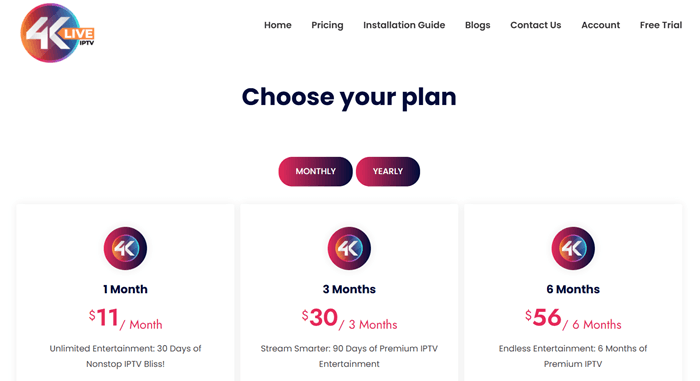
4K Live IPTV Pricing
| Plan | Price |
| 1 Month | $11 |
| 3 Months | $30 |
| 6 Months | $56 |
| 12 Months | $90 |
The listed plans include one device connection, 18,000+ channels, broad device support, and customer support. Longer plans appear on the live checkout page, but the table above sticks to the verified review data.
Streaming Performance and Reliability
In practical use, 4K Live IPTV should perform best on a stable broadband connection and a reliable player such as IPTV Smarters or TiviMate. Popular channels are likely to load faster, while some international or less-used streams can take longer.
The provider recommends at least 16 Mbps internet speed for smoother playback. That is a fair minimum, but for HD and 4K viewing, I would not cut it that close. A strong 5 GHz Wi-Fi connection or Ethernet setup is safer. IPTV can be convenient, but weak internet will still turn a movie night into a buffering documentary.
User Experience and Interface
The viewing experience depends less on the subscription itself and more on the app used to run it. IPTV Smarters, TiviMate, and similar players usually make navigation easier because they offer categories, search, favorites, and guide-style browsing.
With a library this large, scrolling manually gets old quickly. I would set up favorites early, especially for daily channels. Search also becomes important because huge IPTV lists can feel messy on smaller screens. On Firestick and Android TV, a clean player makes the whole setup feel much easier to live with.
4K Live IPTV Setup and Installation Process
- Install a trusted IPTV player on Firestick, Android TV, Smart TV, mobile, tablet, or PC.
- Open the IPTV app.
- Choose M3U playlist login or Xtream Codes login if your app supports it.
- Enter the subscription credentials provided after purchase.
- Let the live channels, VOD library, and guide data load fully.
- Add your regular channels to favorites.
- Restart the app once if categories or VOD sections do not appear properly.
New users should remember that activation is not always immediate. 4K Live IPTV says accounts are usually activated within 30 minutes to 12 hours after invoice payment.
Final Verdict
4K Live IPTV is a strong pick for users who want a large channel lineup, a big VOD catalog, flexible device support, and a low monthly starting price. The 18,000+ channels, 172,000+ VOD titles, and 24-hour trial make it appealing for people who want to test before paying.
It is not perfect. The standard plans support one active connection, activation can take several hours, and stream quality will vary depending on internet speed, server load, and the app used. I would rate it 4.5/10 because it delivers strong value and broad content coverage, but I would avoid calling it completely buffer-free or flawless. That would be marketing talk, not a real review.
This review is for informational purposes only. Users should ensure the IPTV service they choose complies with local copyright laws and content licensing regulations.
FAQ
Is 4K Live IPTV legal?
IPTV legality depends on content licensing and local copyright rules. Users should check whether any provider they choose complies with laws in their region.
Does 4K Live IPTV offer a free trial?
Yes. 4K Live IPTV offers a 24-hour trial, which helps users test stream quality, app setup, and device compatibility.
How many channels does 4K Live IPTV have?
4K Live IPTV lists 18,000+ channels. Availability and stability can still vary by category, region, and stream source.
Does it include VOD?
Yes. The review data lists 172,000+ VOD titles, including movies and series-style content.
Can I use it on multiple devices?
Yes, but standard plans list one active connection. You can use it on different devices, just not at the same time.
How long does activation take?
Activation usually takes 30 minutes to 12 hours after payment confirmation.