Streaming live TV should be simple: pick a channel, press play, and start watching. That’s the dream, right? But does it always work out like that? With so many IPTV services promising seamless streaming, it’s hard to know which one will truly deliver.
In this Osiris IPTV Review, I’m diving into what Osiris IPTV offers, where it excels, and where it could leave you wanting more. The service provides live channels, on-demand movies, and a variety of viewing options, which might appeal to those looking for flexibility. It supports multiple apps and platforms, making it easy to watch TV on your terms.
Quick Summary Table
| Category | Details |
| Service name | Osiris IPTV |
| IPTV channels | 60,000+ |
| VOD availability | 140,000+ |
| Free trial availability | 24-hour free trial |
| Supported devices | Smart TV, smartphone, PC, MAG, Enigma, M3U-compatible apps |
| Streaming quality | HD, FHD, 4K, and 8K streams advertised |
| Pricing starting point | €9.99 for 1 month |
| Overall rating | 3.9/5 |
The rating takes into account the variety of channels, VOD content, pricing, and the flexibility of device compatibility. While it delivers on many fronts, there are a few minor hurdles, especially around streaming quality and setup that could use a little smoothing out.
What is Osiris IPTV?

Osiris IPTV is an IPTV service designed to bring you live TV and on-demand content through apps rather than traditional cable setups. With access to thousands of live channels, movies, and series, it offers flexibility in how you consume content. The service supports M3U, MAG, and Enigma formats, which means it works with many IPTV apps and devices. It’s a solid choice for people who prefer to stream live TV without being tied down by traditional TV service contracts.
Key Features
- Large Channel Range: Osiris IPTV offers over 60,000 channels, spanning entertainment, sports, news, kids’ programming, and more. Whether you’re into international channels or niche interests, you’ll find something to watch.
- VOD Library: With 140,000+ VOD titles, Osiris provides a massive library of movies and series, catering to those who enjoy binge-watching or catching up on the latest shows.
- Multiple Formats: The service supports M3U, MAG, and Enigma formats, making it compatible with a range of IPTV apps and set-top boxes. If you’re familiar with these formats, setup will be a breeze.
- Device Support: Whether you’re watching on a Smart TV, smartphone, or PC, Osiris IPTV has you covered. It’s perfect for those who want to switch between devices without any hassle.
- EPG Access: One of the things I appreciate about Osiris IPTV is its Electronic Program Guide (EPG), which helps you navigate live channels and see upcoming shows. It’s not something every IPTV service includes, and it really enhances the user experience.
- Trial Option: The 24-hour free trial is a great feature for anyone who wants to test the service without committing. It gives you a full day to explore the channels, test streaming quality, and get a feel for the platform.
- Streaming Quality: Osiris IPTV supports HD, FHD, 4K, and even 8K streams. Of course, the actual streaming quality depends on a few factors, like your internet connection and the device you’re using. But the potential is there for great viewing experiences.
- App Compatibility: Osiris IPTV works with popular apps like IPTV Smarters Pro, TiviMate, and IBO Pro. I found the setup to be easy enough, though it may require a bit of knowledge on how to integrate the service with your chosen app.
Osiris IPTV Pros and Cons
| Pros | Cons |
| Flexible setup options with M3U, MAG, and Enigma formats | Limited to one device per account at a time |
| Supports multiple IPTV apps | No lifetime subscription option |
| 24-hour free trial to test the service | Third-party IPTV apps may require additional setup |
| Works across Smart TVs, smartphones, and PCs | |
| Competitive pricing for short- and long-term plans | |
| EPG for easy channel navigation |
Osiris IPTV Pricing Section
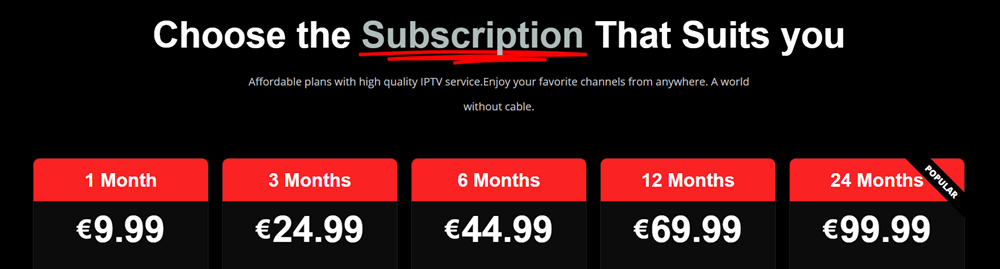
| Plan | Price |
| 1 Month | €9.99 |
| 3 Months | €24.99 |
| 6 Months | €44.99 |
| 12 Months | €69.99 |
The pricing is competitive, especially for those looking for flexibility. The 1-month plan is perfect for testing the service, but if you’re planning to stick around, the 6-month and 12-month plans offer better value.
Streaming Performance and Reliability
In my experience, Osiris IPTV works best with a stable internet connection. When I tested it on a high-speed connection, I had minimal buffering and good-quality streams. However, as with most IPTV services, issues like buffering can arise from server overload or network congestion, so don’t be surprised if things slow down during peak times.
Switching between channels was relatively fast, though some high-demand sports channels did take a bit longer to load. As for the HD, FHD, 4K, and 8K streams, I found that 4K and 8K quality were only stable with high-speed internet. So, while it’s great to have that potential, it’s not always guaranteed unless your connection can keep up.
User Experience and Interface
The user interface depends on the IPTV player you use. I prefer IPTV Smarters Pro and TiviMate for their simple, easy-to-navigate layouts. I didn’t run into many issues with these apps on devices like Firestick and Android TV, but I did have to fiddle with settings a bit during setup to make sure everything loaded properly. Once you get the hang of it, switching between live channels, accessing the EPG, and finding your favorite shows is a breeze.
For complete beginners, it might take a few minutes to figure out how to enter the M3U details or link the service with the app. But it’s not overly complicated if you follow the instructions.
Osiris IPTV Setup and Installation Process
Here’s how you can set it up on your Firestick:
- Connect your Firestick to your Wi-Fi network.
- Install your preferred IPTV app, like IPTV Smarters Pro or TiviMate, from the Amazon Store.
- Open the app and select the login method provided by Osiris IPTV—this could be through M3U, Xtream Codes API, or a portal-style login.
- Enter your username, password, and server URL (double-check for any extra spaces or errors here).
- Wait for the playlist to load. This can take a minute, especially if you’re dealing with a large list of channels.
- Once the channels are loaded, check the EPG to see upcoming shows.
- Test a few channels to see how quickly they load and check the quality.
- Add frequently watched channels to your favorites for quicker access.
The process is simple once you understand the steps, but I recommend testing out the free trial first to see how everything works on your device.
Final Verdict
Osiris IPTV stands out for its massive channel selection and VOD library, making it a great option for those who want variety in their TV lineup. Its competitive pricing, flexibility with supported apps, and 24-hour free trial make it a service worth considering.
However, like all IPTV services, there are a few caveats. The main downside is the one-device-at-a-time limitation, which may be restrictive for some users. Setup can also be tricky for beginners, especially if you’re not familiar with IPTV apps or M3U playlists.
In conclusion, Osiris IPTV offers solid value for the money and is definitely worth trying, especially if you enjoy testing out different IPTV setups. I’m giving it 3.9/5—a strong performer with a couple of minor hiccups.
This review is for informational purposes only. Users should ensure the IPTV service they choose complies with local copyright laws and content licensing regulations.
FAQ
Is Osiris IPTV legal?
While the technology is legal, the content licensing can be tricky. Always double-check that the IPTV provider has the rights to distribute the channels and VOD.
Does Osiris IPTV offer a free trial?
Yes, Osiris IPTV provides a 24-hour free trial so you can test the service before committing.
What devices support Osiris IPTV?
Osiris IPTV works on Smart TVs, smartphones, PCs, and devices that support M3U, MAG, and Enigma formats.
Why does IPTV buffering happen?
Buffering is usually caused by a slow internet connection or high server demand. A stable internet connection should reduce buffering issues.
Can I use Osiris IPTV on multiple devices?
You can install Osiris IPTV on multiple devices, but the service allows usage on only one device per account at a time.
How much does Osiris IPTV cost?
Osiris IPTV offers plans starting at €9.99 per month, with discounts for longer subscriptions.
Which IPTV apps work with Osiris IPTV?
Popular apps that work with Osiris IPTV include IPTV Smarters Pro, TiviMate, and IBO Pro, among others.